API Reference
domilite.dom_tag Module
Classes
|
Base class for any tag object. |
|
Set rendering properties of individual tags |
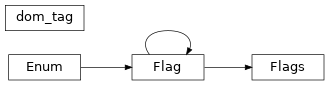
Class Inheritance Diagram
domilite.tags Module
Classes
|
Base class for any tag object. |
|
Any valid HTML tag |
|
The root element of an HTML document |
|
The <head> HTML element contains machine-readable information (metadata) about the document, like its title, scripts, and style sheets. |
|
The <title> HTML element defines the document's title that is shown in a browser's title bar or a page's tab. |
|
The <base> HTML element specifies the base URL to use for all relative URLs contained within a document. |
|
The <link> HTML element specifies relationships between the current document and an external resource. |
|
The <meta> HTML element represents metadata that cannot be represented by other HTML meta-related elements, like base, link, script, style or title. |
|
The <style> HTML element contains style information for a document, or part of a document. |
|
The <script> HTML element is used to embed executable code or data; this is typically used to embed or refer to JavaScript code. |
|
The <noscript> HTML element defines a section of HTML to be inserted if a script type on the page is unsupported or if scripting is currently turned off in the browser. |
|
The <body> HTML element represents the content of an HTML document. |
|
The <main> HTML element represents the dominant content of the body of a document. |
|
The <section> HTML element represents a standalone section of functionality contained within an HTML document, typically with a heading, which doesn't have a more specific semantic element to represent it. |
|
The <nav> HTML element represents a section of a page that links to other pages or to parts within the page: a section with navigation links. |
|
The <article> HTML element represents a self-contained composition in a document, page, application, or site, which is intended to be independently distributable or reusable (e.g., in syndication). |
|
The <aside> HTML element represents a section of a document with content connected tangentially to the rest, which could be considered separate from that content. |
|
The <h1> HTML element represents the most important heading on the page. |
|
The <h2> HTML element represents a second-level heading on the page. |
|
The <h3> HTML element represents a third-level heading on the page. |
|
The <h4> HTML element represents a fourth-level heading on the page. |
|
The <h5> HTML element represents a fifth-level heading on the page. |
|
The <h6> HTML element represents a sixth-level heading on the page. |
|
The <hgroup> HTML element represents a group of <h1> to <h6> elements that form a heading for a section of the document. |
|
The <header> HTML element represents introductory content for a document or an article. |
|
The <address> HTML element indicates that the enclosed HTML provides contact information for a person or people, or for an organization. |
|
The <p> HTML element represents a paragraph of text. |
|
The <hr> HTML element represents a thematic break between paragraph-level elements. |
|
The <pre> HTML element represents preformatted text which is to be presented exactly as written in the HTML file. |
|
The <blockquote> HTML element indicates that the enclosed text is an extended quotation. |
|
The <ol> HTML element represents an ordered list of items, typically rendered with a numbered list. |
|
The <ul> HTML element represents an unordered list of items, typically rendered with bullet points. |
|
The <li> HTML element represents an item in a list. |
|
The <dl> HTML element represents a description list. |
|
The <dt> HTML element specifies a term in a description or definition list, and as such must be used inside a <dl> element. |
|
The <dd> HTML element provides the description, definition, or value for the preceding term (dt) in a description list (dl). |
|
The <figure> HTML element represents self-contained content, potentially with an optional caption, which is specified using the <figcaption> element. |
|
The <figcaption> HTML element represents a caption or legend describing the rest of the contents of its parent <figure> element. |
|
The <div> HTML element is a generic container for flow content. |
|
The <a> HTML element (or anchor element), with its href attribute, creates a hyperlink to web pages, files, email addresses, locations in the same page, or anything else a URL can address. |
|
The <em> HTML element marks text that has stress emphasis. |
|
The <strong> HTML element indicates that its contents have strong importance, seriousness, or urgency. |
|
The <small> HTML element represents side comments such as copyright, contact information, or legal restrictions for the document or an article. |
|
The <s> HTML element represents content that is no longer accurate or no longer relevant. |
|
The <cite> HTML element is used to describe a reference to a cited creative work, and must include the title of that work. |
|
The <q> HTML element indicates that the enclosed text is a short inline quotation. |
|
The <dfn> HTML element represents the defining instance of a term. |
|
The <abbr> HTML element represents an abbreviation or acronym. |
|
The <time> HTML element represents a specific period in time. |
|
The <code> HTML element represents a fragment of computer code. |
|
The <var> HTML element represents a variable in a mathematical expression or a programming context. |
|
The <samp> HTML element represents sample output from a computer program. |
|
The <kbd> HTML element represents user input text. |
|
The <sub> HTML element represents a subscript. |
|
The <sup> HTML element represents a superscript. |
|
The <i> HTML element represents a range of text that is set off from the normal text for some reason, such as idiomatic text, technical terms, taxonomical designations, among others. |
|
The <b> HTML element represents a span of text stylistically different from normal text, without conveying any special importance or relevance. |
|
The <u> HTML element represents a span of text with an unarticulated, though explicitly rendered, non-textual annotation, such as labeling the text as being a proper name in Chinese text (a Chinese proper name mark), or labeling the text as being misspelt. |
|
The <mark> HTML element represents text which is marked or highlighted for reference or notation purposes, due to the marked passage's relevance or importance in the enclosing context. |
|
The <ruby> HTML element represents small annotations that are rendered above, below, or next to base text, usually used for showing the pronunciation of East Asian characters. |
|
The <rt> HTML element specifies the ruby text component of a ruby annotation, which is used to provide pronunciation, translation, or transliteration information for East Asian typography. |
|
The <rp> HTML element is used to provide fall-back parentheses for browsers that do not support display of ruby annotations using the ruby element. |
|
The <bdi> HTML element tells the browser's bidirectional algorithm to treat the text it contains in isolation from its surrounding text. |
|
The <bdo> HTML element overrides the current directionality of text, so that the text within is rendered in a different direction. |
|
The <span> HTML element is a generic inline container for phrasing content, which does not inherently represent anything. |
|
The <br> HTML element produces a line break in text (carriage-return). |
|
The <wbr> HTML element represents a word break opportunity—a position within text where the browser may optionally break a line, though its line-breaking rules would not otherwise create a break at that location. |
|
The <ins> HTML element represents a range of text that has been added to a document. |
|
The <del> HTML element represents a range of text that has been deleted from a document. |
|
The <img> HTML element embeds an image into the document. |
|
The <iframe> HTML element represents a nested browsing context, embedding another HTML page into the current one. |
|
The <embed> HTML element embeds external content at the specified point in the document. |
|
The <object> HTML element represents an external resource, which can be treated as an image, a nested browsing context, or a resource to be handled by a plugin. |
|
The <param> HTML element defines parameters for an <object> element. |
|
The <video> HTML element embeds a media player which supports video playback into the document. |
|
The <audio> HTML element embeds sound content in documents. |
|
The <source> HTML element specifies multiple media resources for media elements (<video> and <audio>). |
|
The <track> HTML element specifies text tracks for media elements (<video> and <audio>). |
|
The <canvas> HTML element provides scripts with a resolution-dependent bitmap canvas, which can be used for rendering graphs, game graphics, art, or other visual images on the fly. |
|
The <map> HTML element is used with <area> elements to define an image map (a clickable link area). |
|
The <area> HTML element defines a hot-spot region on an image, and optionally associates it with a hypertext link. |
|
The <table> HTML element represents tabular data — that is, information presented in a two-dimensional table comprised of rows and columns of cells containing data. |
|
The <caption> HTML element specifies the caption (or title) of a table. |
|
The <colgroup> HTML element defines a group of columns within a table. |
|
The <col> HTML element defines a column within a table and is used for defining common semantics on all common cells. |
|
The <tbody> HTML element encapsulates a set of table rows (<tr> elements), indicating that they comprise the body of the table. |
|
The <thead> HTML element defines a set of rows defining the head of the columns of the table. |
|
The <tfoot> HTML element defines a set of rows summarizing the columns of the table. |
|
The <th> HTML element defines a cell as header of a group of table cells. |
|
The <tr> HTML element defines a row of cells in a table. |
|
The <td> HTML element defines a cell of a table that contains data. |
|
The <form> HTML element represents a document section that contains interactive controls to submit information to a web server. |
|
The <fieldset> HTML element is used to group several controls as well as labels (<label>) within a web form. |
|
The <legend> HTML element represents a caption for the content of its parent <fieldset>. |
|
The <label> HTML element represents a caption for an item in a user interface. |
|
The <input> HTML element is used to create interactive controls for web-based forms in order to accept data from the user. |
|
The <button> HTML element is an interactive element activated by a user with a mouse, keyboard, finger, voice command, or other assistive technology. |
|
The <select> HTML element represents a control that provides a menu of options. |
|
The <datalist> HTML element contains a set of <option> elements that represent the permissible or recommended options available to choose from within other controls. |
|
The <option> HTML element is used to define an item contained in a <select>, an <optgroup>, or a <datalist> element. |
|
The <optgroup> HTML element creates a grouping of options within a <select> element. |
|
The <textarea> HTML element represents a multi-line plain-text editing control, useful when you want to allow users to enter a sizeable amount of free-form text, for example a comment on a review or feedback form. |
|
The <keygen> HTML element exists to facilitate generation of key material, and submission of the public key as part of an HTML form. |
|
The <output> HTML element is a container element into which a site or app can inject the results of a calculation or the outcome of a user action. |
|
The <progress> HTML element displays an indicator showing the completion progress of a task, typically displayed as a progress bar. |
|
The <meter> HTML element represents either a scalar value within a known range or a fractional value. |
|
The <details> HTML element creates a disclosure widget in which information is visible only when the widget is toggled into an "open" state. |
|
The <summary> HTML element specifies a summary, caption, or legend for a <details> HTML element's disclosure box. |
|
The <command> HTML element represents a command that a user can invoke. |
|
The <menu> HTML element is used to group a set of commands that a user can perform or activate. |
|
The <font> HTML element is used to specify the font family, size, and weight of text. |
|
Adds HTML comments. |
Class Inheritance Diagram

domilite.svg Module

Classes
|
|
|
SVG tag class |
|
The animate tag class is used to animate an element's attributes over time. |
|
The animateMotion tag is used to animate an element's motion over time. |
|
The animateTransform tag is used to animate an element's transformation over time. |
|
The circle tag is used to draw a circle. |
|
The clipPath tag is used to define a clipping path. |
|
The defs tag is used to define elements that can be reused throughout the SVG document. |
|
The desc tag is used to provide a description of the SVG document. |
|
The ellipse tag is used to draw an ellipse. |
|
The g tag is used to group SVG elements together. |
|
The image tag is used to embed an image into an SVG document. |
|
The line tag is used to draw a line. |
|
The linearGradient tag is used to define a linear gradient. |
|
The <marker> element defines the graphic that is to be used for drawing arrowheads or polymarkers on a given <path>, <line>, <polyline> or <polygon> element. |
|
The <mask> element defines a mask. |
|
The <mpath> element is used to reference a path element for use in a mask. |
|
The <pattern> element is used to define a pattern that can be used to fill or stroke an element. |
|
The polygon tag is used to draw a polygon. |
|
The radialGradient tag is used to define a radial gradient. |
|
The path tag is used to define a path. |
|
The rect tag is used to draw a rectangle. |
|
The svg tag is used to define an SVG document. |
|
The switch tag is used to define a group of elements that can be used to switch between different elements. |
|
The symbol tag is used to define a graphics object that can be referenced by other elements. |
|
The text tag is used to define text. |
|
The textPath tag is used to define a path for text. |
|
The title tag is used to define a title for an element. |
|
The tspan tag is used to define a subregion of text. |
|
The use tag is used to reuse an element. |
|
The view tag is used to define a view of an SVG document. |
|


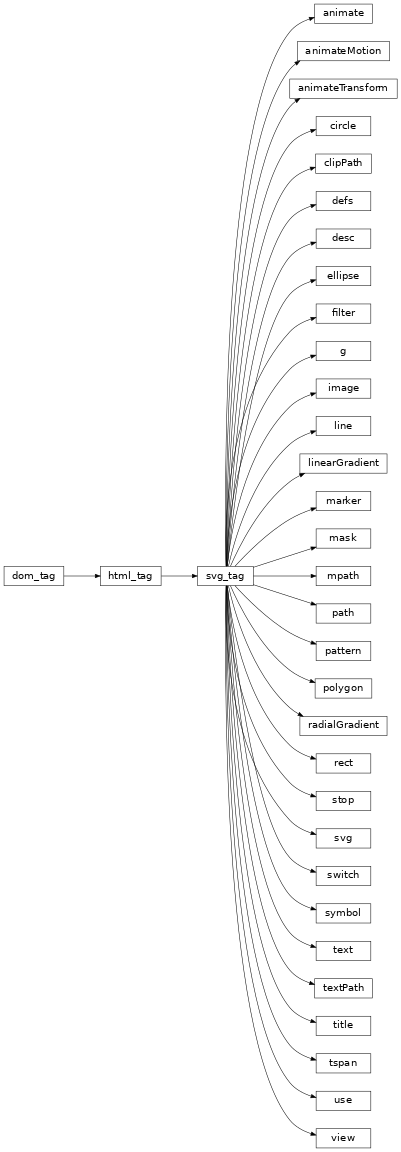
Class Inheritance Diagram
domilite.util Module
Classes
|
|
|
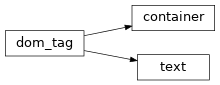
Class Inheritance Diagram
domilite.template Module
Classes
|
A helper for creating tags. |
Class Inheritance Diagram
